2009年4月30日星期四

Monitoring E-Mail with Nagios

Monitoring E-Mail with Nagios

April 30th, 2009 by Mike Diehl in

Your rating: None Average: 5 (1 vote)

Have you ever felt like you were being ignored? Have you ever felt like you were talking but no one was listening? Well, that's how it feels when your e-mail system is broken and you don't know it.

During the past week, I've had a couple system problems that prevented people from receiving e-mail messages that my wife or I sent. The sad part was that we didn't know the messages weren't being delivered. We'd receive a message asking a question, and we'd reply to the sender thinking nothing of it. A few days later, we'd get a phone call from the person asking whether we ever were going to respond.

In our case, two situations were conspiring against us: a change in Comcast's firewall policy and a change in Yahoo's mail delivery policy.

It all began when my wife started complaining that something was wrong with the e-mail system because she'd not heard back from a friend whom she had sent a message the previous day. I sent a quick e-mail to a friend of mine, got a response, and informed my wife that "it worked for me," and chalked it up to her friend not being responsive.

Then, just to demonstrate to her that the mail server was healthy, I asked the server to print out its mail queue. Crap! There were 55 messages in the queue waiting to be delivered. Of course, by this time, even I had noticed that the volume of incoming spam had gone down to none. So, Houston, we had a problem.

After several years of running my own mail server on my home machine connected to the Internet via Comcast, Comcast decided to implement a new firewall policy and started blocking incoming SMTP (tcp/25) connections on its residential users' networks. Of course, I wasn't informed of the change, because I don't use Comcast's e-mail system! Previously, we would send e-mail from our workstations, and our mail server would forward the message through Comcast's smarthost; incoming messages came directly to our server. This configuration had worked for years. But, with the new firewall policy, something broke. Some of our messages were being delivered, and some weren't. I'm speculating that the ones not delivered were going through servers that did sending address verification, and as they couldn't connect back to my mail server to validate my e-mail address, they refused delivery.

So, I decided to take the inexpensive way out. I could have spent an extra $20 a month and gotten a business account with Comcast, which I eventually did, but I didn't at first. I created a VPN tunnel from my home machine to one of my servers on the open Internet. Then, I moved my DNS pointers to point to that machine and had it forward incoming messages through the VPN. I configured my home server to use that machine as its smarthost rather than Comcast's server. Aside from the blatant violation of Comcast's Acceptable Use Policy, this seemed like it would work pretty well.

Then, the other shoe dropped.

My wife and I quickly realized that this was working much better, but it still wasn't quite right. People my wife emailed on a daily basis weren't receiving her messages. The common denominator was that all of these people were using Yahoo e-mail accounts. So, I manually forced delivery of one e-mail messages and saw that Yahoo was deferring delivery due to questionable traffic patterns. And, that made sense; I was trying to deliver 55 deferred messages, probably all at once.

It's important to note that I monitor my e-mail server, and the Exim daemon never sent an alarm, so merely monitoring a service isn't enough. Instead of monitoring the service itself, it's better to monitor the server's function, which is what the rest of this article is about.

I was hesitant to write another article on Nagios, but e-mail is becoming more and more critical, and when it does break, it breaks in strange ways.

Of course, I monitor my Exim daemon as well as my server's route to the Internet. I use a Nagios service check for SMTP, like this:

define service {
use generic-service
name smtp
host_name host.example.com
notification_options w,c,r
service_description E-Mail SMTP Server
check_command check_smtp
}

I use a similar check to monitor my Internet gateway. But, as bad as the e-mail situation became, neither of these alarms would have indicated a problem. So, rather than monitoring to see whether a process is running, I set out to begin monitoring the server's critical functions, e-mail transport and delivery.

The first problem I wanted to address was being informed when messages were stuck in Exim's mail queue. I actually thought I'd have to write a custom program to check for this situation. While researching the situation further, I came across a posting from someone with a similar problem. It turns out that Nagios already has a command that performs this check, and I never knew it. Nagios's check commands are in /usr/nagios/libexec/, and let me tell you, there is a lot of gold in that directory.

So, I created an entry in Nagios's checkcommands.cfg file, like this:

define command{
command_name check_mailq
command_line $USER1$/check_mailq -w 3 -c 5 -v 9
}

Then, I created an entry in the services.cfg file that looked like this:

define service {
use generic-service
name mailq
host_name dominion
notification_options w,c,r
service_description SMTP Mail Queue
check_command check_mailq
}

Finally, I restarted Nagios and tested the new configuration by shutting down my server's outside network interface and attempting to send an e-mail message. Obviously, the mail transport operation failed and I got my alarm.

So at this point, I am pretty sure that if I have another problem with my e-mail system, at least I'll know it in a timely fashion. But, I thought it would be good to put in one more check.

It would be nice to know if my server ever finds itself on a Real-time Blocking List (RBL). Once again, Nagios has a command to check for this situation, but it comes in C source, which I couldn't get to compile. Anyway, I think I like my solution better.

My program looks up the server's IP address at http://www.anti-abuse.org, which, in turn, checks the IP address against several other RBLs at once. I'm probably going to configure Nagios to perform this check a few times a day, at most.

Here's the program:

#!/usr/bin/perl

open CMD, "wget -q http://www.anti-abuse.org/rblresults.php?host=192.168.1.1 -O - |";

while () {
if (!/listed in /) { next; }
if (!/NOT listed in /) { $error++; }
}

if (!$error) {
print "OK\n";
exit 0;
} else {
print "CRITICAL: $error\n";
}

As you can see, it's not that complex. It simply sends a query to Anti-abuse.org and looks for the results. I hard-coded my machine's IP address in this case, but it would be trivial to use one of Nagios' variables and send the IP address as a command-line parameter to this program. Then, the program makes sure that each of the results indicates that my machine is not listed on an RBL. If this check fails, we set a flag for later use. Finally, I created a checkcommand.cfg and services.cfg entry just as I did above.

Now I find myself in the awkward predicament of having written a program that I can't test. In order to test this program fully, I'd have to get my server on an RBL list, which I'm not about to do. Even so, I believe this program will work.

I don't know about you, but I live by e-mail, so my e-mail system simply has to work. The problems I had recently demonstrated that my monitoring policy wasn't sufficient. I believe that the new policy would have alerted me to the situation in a timely fashion. But, as is always the case, you can't test for everything, so I'm sure I'm missing something.

__________________________
Mike Diehl is a freelance Computer Nerd specializing in Linux administration, programing, and VoIP. Mike lives in Albuquerque, NM. with his wife and 3 sons. He can be reached at mdiehl@diehlnet.com

Cloud computing with Linux thin clients

Cloud computing with Linux thin clients

Users and the environment benefit from Linux-based cloud computing systems

developerWorks
Document options

Document options requiring JavaScript are not displayed

Set printer orientation to landscape mode

Print this page

Email this page

E-mail this page


My developerWorks needs you!

Connect to your technical community


Rate this page

Help us improve this content


Level: Introductory

Jeffrey M. Osier-Mixon (jefro@jefro.net), Technical Writer, MontaVista Software, Inc.

28 Apr 2009

Explore cloud computing from a Linux® perspective and discover some of the most innovative and popular Linux-based solutions—with a particular view toward environmentally beneficial options.

Cloud computing has been covered extensively in a number of venues and from many points of view. For embedded Linux engineers and aficionados, one exciting aspect of cloud computing is the sudden interest in thin Linux clients.

The basic concept of cloud computing is the use of resources accessed over the Internet. Combined with clients of limited capability, cloud computing becomes broadly similar to client-server computing over a LAN using dumb terminals or once-vogue thin clients. (The reference to "thin" meant these devices had little or no processing power of their own, relying instead on the processing power of the server.)

Because a great deal of data had to traverse the network, the limiting factor was bandwidth. When graphical thin clients became popular in the mid-1990s, their use was still largely limited to LANs because of bandwidth requirements. The Internet simply wasn't fast enough. But even with this limitation, the benefits of centralization—particularly hardware cost, as computers were expensive and thin terminals were cheap—made it worth the trade-off.

Network computing

This trade-off has disappeared with the rapid growth of readily available high-speed Internet access and the ever-increasing capacity of the Internet backbone itself. The resulting shift to higher throughput makes all kinds of interesting technology feasible.

It is now possible to use a Web browser to perform tasks on a remote server that were previously the sole domain of software hosted on a local machine—even graphics-intensive operations such as page layout or image editing. A large number of companies are creating services to meet the demand. Think of any task you perform locally, and chances are good that some company somewhere is providing that service online, probably at no cost.

This paradigm has also paved the way for new methods of accessing information over networks, including entirely new classes of software and devices. Terminals are no longer dumb, and clients are no longer very thin. For some, the definition of "thin" has grown to include any system that can access the Internet, regardless of its overall capabilities: cellular phones, new devices such as netbooks and mobile Internet devices (MIDs), even re-purposed, older desktop and laptop computers. All clients are thin when the server is as thick, rich, and connected as the Internet itself.

Most industry analysts agree that the use of thin clients—particularly cellular phones—is rising dramatically. In fact, thin clients are expected to be the primary method of accessing the Internet for a majority of people in the world within the next few years.

The network has finally become the computer, as John Gage predicted back in 1984.


Back to top


The bottom line

Usefulness, however, is not always the primary factor that determines wide-scale adoption. A more accurate determination can be made in terms of absolute cost—especially when adoption is considered in developing countries—as well as relative cost in relation to value. A client's thinness bears a direct relationship to its cost, because less capable systems are less expensive to produce. Similarly, the cost of cloud-based software is directly related to its large-scale adoption.

Creative markets and the cost-value ratio

Cloud computing, along with supporting technology like thin clients, is driving organizations to consider creative methods of financing and marketing. For example, One Laptop Per Child (OLPC) produces extremely inexpensive devices (currently in the US$200 range), structure the software around education, and market to governments of developing countries rather than to individuals in order to create educational opportunities in countries that previously had no Internet access or technology education at all. This kind of activity, although eventually profitable for the company, is also beneficial to the world in general.

OLPC's story also points out the importance of considering cost in relation to value. Consider the total cost of a "thick" client. Think of a technical writer at a laptop computer in a coffee house. This laptop may contain all the resources available to complete the project—a word processor, page-layout program, diagramming tools for graphical insets and illustrations, and conversion tools for XML and PDF—all in the self-contained universe of that laptop, which may cost US$2,000 and have similar capabilities to a desktop machine. The software could cost as much as the system itself, resulting in a US$4,000 total investment.

In contrast, that same writer in the same coffee house may work on a thin client—a much smaller, resource-constrained system that literally costs one-tenth as much as the expensive laptop. Thanks to the software and storage available in the cloud, this thin client may have no moving parts, a very simple processor, and just enough resources to run a modern Web browser and a fast network connection, but the writer has as many—possibly even more—resources at hand than the local user, as well as the safety of knowing that his or her work will survive even if the battery dies or the laptop itself is stolen.

The software available in the cloud can produce documents of the same quality with similar levels of control over the end product, yet it is absolutely free, subsidized by corporate adoption, by advertising, or by some other creative monetization process. Total investment by the user: US$200.


Back to top


Penguins in the clouds

The best operating environment for a thin client designed around cloud computing has the following characteristics:

  • Highly customizable
  • An inexpensive or even free operating system
  • All necessary applications inexpensive or free
  • Networking built into the operating system core
  • Small enough to fit into tiny devices
  • Flexible and powerful enough to run full laptops
  • Miserly enough to conserve battery life to a maximum degree

Linux meets all of these criteria. It is taking over in the mobile space, the enterprise space, and the embedded space, including dedicated consumer devices such as book readers and set-top boxes. And with virtualization, Linux can also run applications built for the Windows®, Mac OS X, and other operating systems.

Linux: the operating system for the cloud

Linux has matured and become viable as an embedded operating system; its freedom—both in terms of cost and royalty-free licensing—has revolutionized a market that once was dominated by only a few players who demanded stiff per-unit royalties. Linux now has real-time support as well as structured driver support with a flexibility never dreamed of for proprietary real-time operating systems, and the availability of relevant applications is unprecedented. Linux is the basis behind at least four new netbook operating systems, leads the explosive growth in smart phones, and is slated to continue to absorb market share over the next 5 to 10 years.

The flexibility, developer control, power-management facilities, and overall stability of Linux also make it well suited to older, recycled systems. You can give older machines a new life by loading Linux instead of (or in addition to) the host operating system.

Applications for accessing the cloud

What about applications? Something beyond the operating system is required in order to gain access to the cloud, and cost must be considered here, as well. The cloud has made thin clients possible, but the key to making them inexpensive is limiting the cost of the software to run them.

As most developers know, some of the most powerful network-oriented applications available are completely free, including Web browsers (such as Firefox, Opera, and Chrome), e-mail software (such as Thunderbird and Evolution), instant messaging (such as Pidgin and Trillian), and multi-platform application environments (such as Java™ technology). The combination of just these four application types alone would make a formidable thin client, all completely free.

Note, however, that free, open source operating systems and applications do not mean that you can make a device completely without cost. As noted open source developer Jamie Zawinski famously said, "Free software is only free if your time has no value." You must accept a certain amount of work to design and implement systems based on free software, just as you must do when evaluating proprietary software. However, because the base product is free and its source code is available, the value gained for that time is far higher for free software than for paid software, even if the process itself takes a little longer.

It is no wonder that there are over 100,000 embedded Linux developers currently, and the number is growing.


Back to top


What thin clients currently exist?

This section describes several types of thin clients on the market today. Many of these clients are new devices still finding their niches in the hearts of consumers and enterprises. All share a few common features: they have little storage and processing power of their own relative to the functions they are designed to perform, they are all designed around cloud computing, and they all run operating systems based on Linux and other open source software.

Netbooks

A netbook is a small, underpowered (by modern standards), yet fully functional laptop, usually supporting wireless networking. Netbooks are designed to be used as thin clients, and many have no fans or disk drives.

Examples include the OLPC XO, the Asus EEE PC, and the MSI Wind. Most run full-scale Linux distributions like Fedora or Ubuntu, although some have distributions developed for them specifically, like OLPC's Linux-based Sugar operating system, which was developed by educators as a learning environment. The Sugar interface is also available to run on a standard Windows or Apple system (see Resources for links to more information).

MIDs

A mobile Internet device (MID) is a very small-scale device with a touchscreen and, optionally, a thumb-sized keyboard. Also known as ultra-mobile PCs (UMPCs), MIDs support wireless networking and are designed specifically for mobile use. (They are roughly the size of cellular phones.) The principal difference between netbooks and MIDs is size, because many use the same processors, although MIDs are generally less capable: they have less storage, less memory, and smaller screens.

Examples include the Nokia N810, the Sony Vaio P, and the Acer Aspire ONE series. Nearly all devices known as MIDs run some variant of Linux. The Nokia device in particular runs Maemo, a combined kernel and middleware platform whose user environment is relatively constrained and optimized in order to keep resources available for applications, although some developers have created alternative desktop environments. Also available is Ubuntu MID Edition, which can be built together with Moblin on Intel®-based middleware sets, to yield a powerful operating environment.

Smart phones

These overgrown cellular phones, which started out as enterprise devices capable of reading e-mail and browsing the Web, have exploded in popularity. Many come with thumb keyboards and fast, always-on Internet connections because of the simultaneous massive growth of 2.5G and 3G cellular telephone data networks.

Examples of smart phones with keyboards include the new Palm Pre, the HTC G1, and the OpenMoko project. Some without keyboards include the Motorola Krave ZN4, the Samsung Anycall SCH-i859, and the Emblaze Mobile Edelweiss, and the Purple Magic reference design from French company Purple Magic. All of these phones are based on Linux.

Many new phone designs running variants of Linux have recently been announced. Linux distros designed specifically for smart phones include Android (a Google product) and software based on LiMo, a smart phone standards organization.

Dedicated devices

Some dedicated devices also rely on the network for their primary functions. Electronic book readers must have some method of downloading books: The Amazon Kindle uses a cellular-based network connection to connect directly to Amazon's server. (Note that the Kindle runs Linux.) Other dedicated, network-capable devices include the TiVo digital video recorder (DVR) and the Roku Netflix Player video-streaming set-top box, both of which run Linux.

Hybrid devices

There is a new device entering the market that might best be called a hybrid cloud computer. It is a standard office laptop with an interesting twist: a thin Linux-based client built directly into the hardware that shares the keyboard, screen, and network connection. It may seem strange to have two computers in one case, but the utility becomes apparent when the thin client turns on and connects instantly like a cellular phone, stays on for up to 18 hours with a standard battery, and goes to sleep so the user can boot into the larger machine whenever necessary. It is a true cloud machine with a local backup.

The only current hybrid device is the Dell Latitude E4200/E4400 series (the capability is called Latitude ON), but more such devices are planned in the near future.


Back to top


Green penguins, green clouds

There are environmental benefits to both cloud computing and the use of thin clients based on Linux.

Cloud computing centralizes resources, which means that all the hard processing happens on large, fast machines somewhere out there "in the cloud." Some companies—Google in particular—have taken this concept to heart by locating server farms physically close to power-generating stations, as they have in Oregon and in Eemshaven, The Netherlands (near a large set of windmills). Because much of the efficiency of electrical power is lost in transport, this is good for the planet as well as for the company. Google has also (famously) patented a floating wave-powered server farm, which would not only be co-located with its power source but would also be totally sustainable.

There are additional benefits to thin Linux clients. First, they are "thin," meaning that they contain low-powered hardware and thus use much less electricity than expensive laptops. Second, they run Linux, which has many advantages related to power management, even on older hardware.

Third and most importantly, Linux runs practically everywhere. Rather than consigning an old computer to the e-waste scrap heap, give it a new, inexpensive hard disk—or just boot from a CD or a USB flash drive (UFD)—and re-purpose the computer as a thin client.

The earth will thank you.


Resources

Learn

Get products and technologies
  • Some popular, free Linux environments suitable for thin clients include:
  • With IBM trial software, available for download directly from developerWorks, build your next development project on Linux.


Discuss
  • Get involved in the My developerWorks community; with your personal profile and custom home page, you can tailor developerWorks to your interests and interact with other developerWorks users.


About the author


Jeffrey Osier-Mixon is a technical writer, open source advocate, and community manager. He blogs about open source software, runs the Meld embedded Linux community, and speaks at Linux conferences.

2009年4月29日星期三

Alexis Weissenberg -《哥德堡变奏曲》

Alexis Weissenberg -《哥德堡变奏曲》(Goldberg Variations)[FLAC]

请登录
关闭
状态: 精华资源
摘要:
发行时间: 2001年
时间: 2小时前 发布 | 2小时前 更新
分类: 音乐   古典音乐  
统计:370次 浏览
相关: fav  subtitle
专辑英文名: Goldberg Variations
专辑中文名: 哥德堡变奏曲
艺术家: Alexis Weissenberg
资源格式: FLAC
发行时间: 2001年
地区: 法国
简介: 

IPB Image

钢琴:Alexis Weissenberg
录音时间:1981年
唱片公司:EMI(France)
唱片编号:7243 5 74952 2 6
资源出处:来自网盘Rapidshare,感谢原发布者

专辑简介:

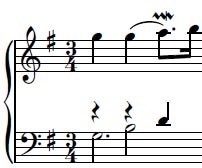
哥德堡的演奏自由度似乎是很大的,主要有三个方面,装饰音的处理,速度,反复。拿装饰音来说,aria的第一小节,乐谱上应该是一个复逆波音。
IPB Image
而 很多人演奏成逆波音,例如古尔德,加夫利诺夫,佩拉希亚等。怀森伯格,莱昂哈特等这里则是按照原谱来演奏的。一丝不苟的遵循乐谱的恐怕就属图内克了。我并 不是说一定要严格按照乐谱演奏才行,而是装饰音的处理可以体现演奏的风格。有的钢琴家喜欢在演奏哥德堡时加入“DIY”的装饰音(典型的就是希夫),有人 觉得这样听起来更富有感情,有人觉得这样不严谨,这是一个见仁见智的问题。肯普夫的哥德堡走了极端,他去掉了所有的装饰音,听起来就味同嚼蜡了。所以我觉 得演奏哥德堡,对装饰音的处理很重要。(本人肤浅的评论)

逻辑与热情并存的超技大师

  怀森伯格不是那种容易被贴上标签与放在某个框架中看待的艺术家,但他却也不是那种因为谜一般的演奏风格而难以被分类或了解的音乐家(正好相反),他认为艺术如能够被归类轮廓清晰化本身就是一种矛盾。他的言论总是激起诸多评论。
他最早是在祖国保加利亚的弗拉季格罗夫门下学习钢琴,第二次世界大战之后他在纽约的茱丽亚音乐学院向奥尔嘉.萨玛罗芙习琴,而完成他的学业,身为1947 年列文垂特大赛的第一名,他找到决定性的赞助者,是乔治.塞尔与尤金.奥曼第,他们立刻为他开创国际性的演奏生涯。「我们这个时代最好的钢琴家之一」,是 这位曾与怀森伯格在唱片与电影计划上合作过的指挥家卡拉扬读过的话,使得以后所有对钢琴家的评论都把怀森伯格放在一个完全不同的水平上,但也招致了非议: 那些人认为怀森伯格在技巧与智性的大师性格背后,隐含的是一种冷酷的完美主义,与内部沉潜性格的缺乏,则以宽广而张力大的圆弧线塑造乐句,精细地加工每个 音符,将之视为珍品般地对待。如此的巴哈呈现的是充满活力的,与怀森伯格几年前被称为「八音盒」、「稀薄的琴声」有着大大的不同。
我们可以在瑞士琉森的系列音乐会里听到怀森伯格在各方面不拘泥于教条的表现,他带来了完全不同以往的演绎方式,如同大键琴家佟.库普曼一样。特别强调的是 怀森伯格身居教职时的心胸广大,例如他自九○年代起,每年在离琉森不远的艾根堡举行大师班,在这里他以「没有秘诀」的途径教授,让学生试着对乐曲「了解胜 于判断」。他的学生说:「当只有一个人知道作曲家的意图与该如何演奏的时候,将会是个多么恐怖的时刻!」
一个不照教条演奏的实际例子就是史卡拉第的单乐章键盘奏鸣曲,这些是单传自传统音乐里的优美作品,在传统演绎之下少有新的尝试。怀森伯格可以说带出作品本 身多层面貌,例如他在《a小调奏鸣曲》(K.109)里借着神秘感点出一瞥真实的浪漫心情,在最弱音处的宏亮或是阴暗音色部表现地极为完美,然而他也使用 了过度的颤音,为的是想要模仿出大键琴光辉明亮的效果。如此他以契合曲子本身的特性去演奏,例如在《b小调奏鸣曲》(K.87)里出现明显的弹性速度、 《F大调奏鸣曲》(K.107)里一种反复无常而富于美感的演奏技巧。
所有音乐的情感因素「在被演出前先要被引导」,怀森伯格的说法反映出他演奏作品的特色——对一份作品经年累月、加上自我批判的长期准备后——常会被误解成 知性控制的一项辩解。但是演奏时的自我控制,的确可以发现之前没有注意到的表达力,这种特色就出现在他录制德布西的《版画》,印象主义对自然的想象里,他 的神秘不是在于利用朦胧的手法,而是借着对音色控制严密的计算后所出来的效果,这范围从阴暗晦柔的闪闪发光似的到如同水晶透明澄亮的。(节选自 Philips二十世纪伟大钢琴家系列第97卷说明书)


专辑曲目: 

01. Aria
02-31. Variation 1-30
32. Aria

Vim regexes are awesome

Vim regexes are awesome

Two years ago I wrote about how Vim's regexes were no fun compared to :perldo and :rubydo. Turns out I was wrong, it was just a matter of not being used to them.

Vim's regexes are very good. They have all of the good features of Perl/Ruby regexes, plus some extra features that don't make sense outside of a text editor, but are nonetheless very helpful in Vim.

Here are a few of the neat things you can do.

Very magic

Vim regexes are inconsistent when it comes to what needs to be backslash-escaped and what doesn't, which is the one bad thing. But Vim lets you put \v to make everything suddenly consistent: everything except letters, numbers and underscores becomes "special" unless backslash-escaped.

Without \v:

:%s/^\%(foo\)\{1,3}\(.\+\)bar$/\1/

With \v:

:%s/\v^%(foo){1,3}(.+)bar$/\1/

Far easier to read. Along with \c to turn on and off case sensitivity, these are good options to make a habit of prepending to regexes when needed. It eventually becomes second-nature. See also :h /\v

Spanning newlines

One thing that :perldo and :rubydo can't do is span newlines; you can't combine two lines and you can't break one line into two.

But Vim's regexes can span newlines if you use \_. instead of .. I find this to be a lot more aesthetically pleasing than Perl's horrible s and m modifiers tacked onto the end of a regex. e.g. this strips <body> tags from a text document.

:%s@<body>\v(\_.+)\V</body>@\1@

(Note: in real life, never use a regex to parse HTML or XML. Down that path lies madness. The above is OK because I'd expect only one <body> tag to appear in any document.)

(Note^2: being able to turn on and off magic in the middle of a regex is awfully helpful.)

(Note^4: You can use arbitrary delimiters like @ for the regex, which is useful if your pattern includes literal /'s.)

See also :h \_.

\zs

Vim lets you demand that some text match, but ignore that text when it comes to the substitution part. This is handy for certain specific kinds of regexes. Normally if you want to match some text and then leave it alone in the substitution, you have to capture it and then put it back manually; \zs lets you avoid this.

Say you want to chop some text off the end of a line, but leave the rest of the line alone. Normally you'd have to do this:

:%s/\v^(foobar)(baz)/\1/

to put the foobar back. Of course you can also use a zero-width lookbehind assertion:

:%s/\v(^foobar)@<=baz//

But that's even more line-noise. This is the easiest way:

:%s/^foobar\zsbaz//

See :h /\zs. (And :h /\@<= if you're so inclined.)

Expressions

Using \=, you can put arbitrary expressions on the right side of a regex substitution. For example say you have this text:

~/foo ~/bar

If you do this:

:%s/\v(\S+)/\=expand(submatch(1))/g

You end up with:

/home/user/foo /home/user/bar

Because you can also call your own user-defined functions in the expression part, this can end up being pretty powerful. For example it can be used to insert incrementing numbers into arbitrary places in your text. See :h sub-replace-\=.

And so on

Read :h regexp if you haven't already. Tons of other features in there that can make your life easy if you manage to internalize them. It is difficult to get used to Vim's funky syntax if you're very familiar with Perl/Ruby-style regexes, but I think it's worth it. Only took me two years! (OK, more like a couple days of concerted effort after a year-and-a-half delay.)

users, who - Display who is logged in your system

users, who - Display who is logged in your system -

For Desktop computers, this is usually needless, as you may be the only user logged in at an any given time, but if you are a server admin, you know that there may be a lot of users connected to the Server at a given time.

It is useful to know who they are, and maybe also, what are they doing, this for security reasons, but also if you are planning any server maintenance or reboot, you will have to know who are logged, and what are they doing to know if you can reboot the server in that moment, or have to wait.

users

Users is a very simple command that will list all users connected to the computer when it is run:

users

ggarron ggarron ggarron root root

You can see that ggarron and root appear more than once, this means that, those users are logged in, using differed terminal sessions.

who

This command gives some more information that the simple users, it also gives you from where the user is logged in.

who

ggarron  tty1         Apr 25 10:01
root tty2 Apr 25 10:41
ggarron tty3 Apr 25 10:41
ggarron pts/0 Apr 25 10:09 (:0.0)
root pts/1 Apr 25 10:42 (force.alketech.com)

And also the time when that users logged into the server.

There are some other usages.

who -b

Prints the time of last system boot

who -Hu

NAME     LINE         TIME         IDLE          PID COMMENT
ggarron tty1 Apr 25 10:01 00:46 5354
root tty2 Apr 25 10:41 00:08 5355
ggarron tty3 Apr 25 10:41 00:07 5358
ggarron pts/0 Apr 25 10:09 00:03 5660 (:0.0)
root pts/1 Apr 25 10:42 00:07 5974 (force.alketech.com)
ggarron pts/2 Apr 25 10:46 . 6011 (:0.0)

Prints more info about logged users than using it with no options.

w

w is like a complement to who as it displays logged users, but also what are they doing in that moment.

w

 10:53:38 up 52 min,  6 users,  load average: 0.08, 0.05, 0.01
USER TTY LOGIN@ IDLE JCPU PCPU WHAT
ggarron tty1 10:01 50:14 1:23 0.00s /bin/sh /usr/bin/startx
root tty2 10:41 11:34 0.00s 0.00s -bash
ggarron tty3 10:41 11:01 0.02s 0.02s ssh force.alketech.com
ggarron pts/0 10:09 1:17 0.00s 0.00s man w
root pts/1 10:42 11:01 0.00s 0.00s -bash
ggarron pts/2 10:46 0.00s 0.00s 0.00s w

last - See any user login history

last - See any user login history -

last is another command for the system admin tool box, it displays the login history of all or any specific user.

Yo do not need to be root to use it:

last

ggarron  pts/1        200.87.61.2      Sat Apr 25 11:02   still logged in   
ggarron pts/0 200.87.61.2 Sat Apr 25 10:41 still logged in
publico pts/0 10.1.1.86 Fri Apr 24 16:25 - 16:47 (00:22)
ggarron pts/0 200.87.61.2 Sat Apr 18 19:34 - 19:54 (00:20)
ggarron pts/0 10.1.1.43 Wed Apr 15 15:27 - 10:30 (19:03)
root pts/0 200.87.61.2 Mon Apr 13 22:41 - 01:11 (02:29)
ggarron pts/0 200.87.61.2 Sat Apr 11 15:25 - 15:28 (00:02)
ggarron pts/0 200.87.61.2 Fri Apr 10 10:40 - 22:33 (11:53)
publico pts/0 10.1.1.86 Thu Apr 9 12:02 - 12:02 (00:00)
publico pts/0 10.1.1.86 Thu Apr 9 12:01 - 12:01 (00:00)

You can also make the IP or name of the system from where the users logged it, to appear in the last column

last -a

ggarron  pts/1        Sat Apr 25 11:02   still logged in    200.87.61.2
ggarron pts/0 Sat Apr 25 10:41 still logged in 200.87.61.2
publico pts/0 Fri Apr 24 16:25 - 16:47 (00:22) 10.1.1.86
ggarron pts/0 Sat Apr 18 19:34 - 19:54 (00:20) 200.87.61.2
ggarron pts/0 Wed Apr 15 15:27 - 10:30 (19:03) 10.1.1.43
root pts/0 Mon Apr 13 22:41 - 01:11 (02:29) 200.87.61.2
ggarron pts/0 Sat Apr 11 15:25 - 15:28 (00:02) 200.87.61.2
ggarron pts/0 Fri Apr 10 10:40 - 22:33 (11:53) 200.87.61.2
publico pts/0 Thu Apr 9 12:02 - 12:02 (00:00) 10.1.1.86
publico pts/0 Thu Apr 9 12:01 - 12:01 (00:00) 10.1.1.86

Or only displa the history for a given user.

last publico -a

publico  pts/0        Fri Apr 24 16:25 - 16:47  (00:22)     10.1.1.86
publico pts/0 Thu Apr 9 12:02 - 12:02 (00:00) 10.1.1.86
publico pts/0 Thu Apr 9 12:01 - 12:01 (00:00) 10.1.1.86

2009年4月28日星期二

dw-world

猪流感问答ABC


"猪流感"这个名词突然之间成为众人讨论的焦点。然而,这到底是一种什么样的疾病呢?要预防这种传染病,又需要注意什么呢?德国电视一台《每日新闻》网站(tagesschau.de)就一些与猪流感有关的问题提供了专业的解答。


猪流感到底是什么?


猪流感首先只是一种非常普通的呼吸道疾病。这种流行性感冒在人和猪身上的发病率相似:感染率较高,但是死亡率相对较低。


这种猪流感病毒为什么如此危险?


和其它的流感病毒一样,猪流感病毒也是在不断变化的。假如一头猪同时感染了猪类、鸟类和人类的病毒,那么这些病毒的基因特征就会发生互相交换。这样,就会产生一种新型的病毒,这种病毒同时包含动物病毒和人类病毒的基因特征。这次的猪流感病毒显然就是发生了这种变异。


这次的新型猪流感病毒是H1N1型病毒的一个变体—这是什么意思?


H和N分别是病毒表面所含蛋白质的名称"血球凝集素"(hemagglutinin)和"神经氨酸酶"(Neuraminidase)的英文名称缩写。一共存在16种不同结构的血球凝集素和9种神经氨酸酶。1930年,人们首次分离出了H1N1的A型病毒。


猪流感是如何传播的?


猪 流感病毒可以直接从猪传染到人的身上(相反,也可以由人传染给猪)。到目前为止,人类感染的病例都是通过与猪的直接接触传播的。而这次在墨西哥爆发的疫情 显示,这种猪流感病毒也可以在人与人之间传播,其传播的途径和常见的其它流感病毒类似,比如通过病人咳嗽或是打喷嚏时溅出的飞沫等。


这次的猪流感疫情会发展成为全球性的瘟疫吗?


世界卫生组织总干事陈冯富珍表示,这次疫情"有发展成为瘟疫的潜在危险"。因为大部分人很有可能不具备抵抗这种新型病毒的免疫力。而这种病毒究竟有多大的危险性,有关专家将在未来的几天里作出解答。


这种猪流感病毒有可能会蔓延到德国吗?


并不排除通过旅行者将流感病毒带到德国的可能性。


那现在吃猪肉会不会有危险呢?


没有危险。根据美国疾病控制与预防中心提供的信息,猪流感不会通过食物渠道传播。如果想要保证万无一失,只需要在烹饪时将猪肉加热至72摄氏度以上,就可以杀死病毒。


目前有没有治疗猪流感的药物?


美国疾病控制与预防中心目前已经初步证明,两种较新的治疗流感药物--达菲(有效成分为奥斯他韦)和瑞乐沙(有效成分为扎那米韦)--可以有效治疗目前流行的这种猪流感。


有没有预防猪流感的疫苗呢?


目前还没有发现有效预防猪流感的疫苗,普通的流感疫苗在这里是不起作用的。世界卫生组织和美国疾病控制机构目前已经分离出了H1N1型病毒的样本,以便于把样本交给药物制造商进行疫苗研制工作。


假如感染了猪流感,会出现什么症状呢?


猪流感的症状和普通流感类似:发热、疲劳、食欲不振和咳嗽等。有些患者还会出现流鼻涕、咽喉疼痛和反胃等症状。伴随猪流感出现的腹泻和呕吐症状会比普通流感更为严重。


现在到存在疫情的地区去有没有危险呢?


德国,法国和西班牙官方建议公民在没有必要的情况下不要到墨西哥去。中国目前已经停止从墨西哥和美国三个州进口猪肉和猪肉制品,各地出入境检疫部门也加强了口岸卫生检疫和疫情监测工作。


作者:ARD /雨涵


责编:乐然


斯里兰卡战火不断百姓深陷苦海


为了保护平民,斯里兰卡政府宣布不再使用大口径机枪以及停止空袭反叛的猛虎武装分子。斯里兰卡总统府还发出通告,战斗中只准使用轻型武器,目的是让那些被围困在沿海地区的平民百姓得以离开战区。斯里兰卡燃烧的战火给当地百姓带来深重灾难,引发全世界舆论的关注。


4月27日,斯里兰卡总统府发表了一 份"战斗已经结束"的声明。此前,反叛的泰米尔猛虎解放组织要求实现停火,停火与"战斗结束"并非是同一个概念。斯里兰卡政府发言人对此作出如下解释:" 为了确保无辜百姓的安全,政府决定,军队不准再用大口径机枪以及停止空袭。除此之外,没有什么停火的说法。"


按照斯里兰卡政府的解释,政府军正在设法从反叛武装那里解救出无辜平民。事实上,旨在消灭猛虎解放组织的军事行动仍在继续。


印度对斯里兰卡政府的说法却有不同的理解。印度内政部长奇丹巴拉姆说:"斯里兰卡政府宣布'战斗已经结束',我们把这句话理解成结束所有的军事行动。"


看来,在国际舆论压力下,科伦坡政府只做出了部分妥协。政府军相信战胜数十年来宿敌泰米尔猛虎武装的日子已近在咫尺,他们不愿给分离武装分子以喘息的机会。过去,分离分子正是利用停火赢得了时间,重整旗鼓,获得了新的战斗力。


在刚刚过去的周末,反叛武装提出要求,为了顾及百姓的安全,希望实现暂时停火。不过,斯里兰卡政府却认为,泰米尔是故意利用百姓作人肉盾牌。政府发言人说:"我们相信,泰米尔组织的领导人就藏在平民百姓中。正是如此,无辜百姓变成了人质。"


泰米尔猛虎组织宣称,目前,已有16万平民离开了战区。但联合国却说,只有5万人逃离了险境,斯里兰卡政府说,只有1万 5000人撤离。不知以上数字哪个准确,但这些人的处境仍然令人担忧。


上周初,的确有超过10万人数的难民从该国东北部战区逃离了险境。一名难民证实道:"所有食品全部都消耗完毕。非常困难。我们在途中遭到炮火袭击。我们曾在一个防空洞里蹲了一个月。非常害怕。"


作者:Sabina Matthay / 李鱼


人类大流感回顾


随着猪流感疫情的进一步蔓延,世界卫生组织已经将猪流感的警戒级别调高至第四级,该组织总干事陈冯富珍表示,猪流感病毒有在全球广泛爆发的可能性。专家指 出,当一种新型的病毒广泛传播,而大多数人还不具备抵抗这种新病毒的自然免疫力时,全球性的瘟疫就会爆发。至少从16世纪起,各种流感瘟疫就一直在以不规 律的间歇不断爆发。


世 界卫生组织宣布,北美爆发的猪流感疫情构成了国际关注的突发公共卫生事件,并将目前人类大流感警戒级别从第三级调高到第四级,即出现病毒在人与人之间持续 传播的阶段。人类大流感警戒级别共分为六级,世界卫生组织表示,把警戒级别调高到第四级意味着出现人类大流感的可能性增加了,但并不是不可避免。


在 过去的一个世纪里,全球性的流感瘟疫,也就是世界卫生组织所说的人类大流感,一共出现过至少五次。1918年至1919年爆发了被称为"史上最恐怖的流 感"--西班牙流感,这种病毒也是H1N1型病毒的一个种类,主要袭击青壮年,当时造成了全球大约20%到40%的人口感染,死亡人数至少有4千万到5千 万,是一战死亡人数的差不多五倍。这种病毒最早是在美国发现的,但是之所以得名"西班牙病毒",是因为当时的西班牙媒体对这种瘟疫投入了大量的精力报道, 而在第一次世界大战期间,许多其它国家的媒体处于严密的监控之下,无法进行自由报道。


20世纪的第二次大型全球性流感,是1957年爆发的所谓亚洲流感。这种流感病毒属于H2N2型病毒,最早在中国发现。该流感病毒早期感染的是儿童,后来则主要袭击老年人。这一波亚洲流感造成全球大约2百万人死亡。


1968年爆发的香港流感是上世纪疫情最轻的一次人类大流感。这种H3N2型流感病毒最早出现于香港,之后在接下来的两年中扩散到全世界。患病者主要是老年人,全球死亡人数大约为一百万。


进 入21世纪之后短短的不到十年里,世界上已经出现了数次流感瘟疫,但是它们的严重性和死亡人数已经比20世纪时大大降低。2002年11月,在中国广东省 出现了首例非典型性肺炎感染者。这种高危险性的肺炎简称萨斯,由于在2003年上半年在中国大部分地区以极快的速度广泛传播,加上中国有关卫生部门和政府 机构在疫情出现的初期采取隐瞒的做法,导致了许多人的恐慌。据统计,全世界一共有8000人左右感染萨斯病毒,死亡人数约为800人,其中中国有将近 350人。


2003年,H5N1型高致病性禽流感病毒由越南蔓延到东南亚其它国家,中国也受到了一定程度的波及。禽流感病毒至今一共造成250多人死亡。与这次在墨西哥爆发的猪流感不同,禽流感病毒只能通过禽类向人类传播,而不会在人与人之间直接传播。


几乎年年都有不同程度的流感疫情出现。正是因为流感病毒变异的速度十分迅猛,所以也对医学界研制治疗药物和疫苗提出了很大的挑战。据世界卫生组织公布,全球每年都有300万到500万人感染严重的流感,其中大约有25万到50万人因流感而死亡。


作者:雨涵


责编:乐然


sssh - 快速 ssh 登陆脚本

sssh - 快速 ssh 登陆脚本

此 脚本对于那些需要经常 ssh 登陆远程服务器的朋友应该有点用处。尤其是需要中转服务器 ssh 2 次以上的。脚本功能包括:将服务器 IP 和密码保存于文本文件中 (明文保存,安全性要自己保证),方便登陆,支持多次 ssh 中转,支持服务器编码自动转换,支持某个用户名的通用密码。

使用方法:

最好将脚本保存在 PATH 变量包含的路径下,建议保存于 ~/bin 并确保此目录在 PATH 中。

编写 ~/.pass 文件,并执行 chmod 600 ~/.pass

安装 expect 包。

.pass 文件的写法:

  1. 最

2009年4月27日星期一

Explore your BlackBerry with secret codes

Explore your BlackBerry with secret codes

Want to dig a bit deeper into your BlackBerry than what the menu lets you do? Cool. So do I. Even if these things aren't of much use, it's still neat to know what your BlackBerry can do if you just know how to do it. Today we'll go over "secret" codes — though anything one can find from a basic Google search isn't much of a secret nowadays. These codes can do a number of things, from organizing your Address Book to simulating a battery pull. After the jump we'll have the lot of them.

To display signal in decibels rather than bars: Hold Alt and press N M L L. The same sequence turns it back. I did this on my 8330, and it just made the bars invisible; no decibel meter appeared.

To verify Address Book file: Hold Alt and press V A L D in Address Book. To reorganize your Address Book, hold Alt and press R B L D.

To view Web page source code: Hold Alt and press R B V S when on the Web page.

View technical information: Hold Alt and left Shift, then press H. This brings up crucial information about your device which can be useful when seeking help from technical support (or forums, but some of that info you might want to keep to yourself). You can view your IMEI by pressing * # 0 6 # on the Home Screen — though I did not get this to work myself.

Simulate a battery pull: Instead of Ctrl-Alt-Delete, this one is Alt-Right Shift-Delete. Make sure to hit Right Shift, not Left Shift.

Display you event log: Hold Alt and press L G L G.

Thanks to CB user cyba.cowboy for the list.

This post originated at BBGeeks.com - home to all things Blackberry! Also a great source of info about Verizon BlackBerry.

Explore your BlackBerry with secret codes

This post originated at BBGeeks.com - home to all things Blackberry! Also a great source of info about Verizon BlackBerry.

Explore your BlackBerry with secret codes

2009年4月26日星期日

黑人的BB

黑人的BB

亲爱的哥们,假如您是通过搜索引擎到了这页,我只能说您口味太重了。其实我今天要说的黑人是奥巴马和他的BlackBerry。

有新闻说,自从这哥们当上米国大统领以后,党小组的有关同志开会研究决定,从国家信息安全方面考虑,建议奥巴马不要再玩他的心爱BB了。可丫当了大统领以后就目中无人,不服从组织的决定。最后国家安全局不得不动用纳税人的金钱,改造出一台号称最安全的黑莓手机。

新闻本身就是这样,但是读解这条新闻的角度确是非常有意思的一件事。对于国内的摆酷青年,基本上这是一个比较正面的新闻。因为使用黑莓的设备在他们 觉得是一件很酷的很有档次的一件事情。在他们看来,这一比档次就出来了,中国不引进黑莓手机不开放wifi这说多么傻逼多么短视的一件事情啊。看看人家美 国政府多么开放多么人性化。然后越说越气的就开始骂,中国电信垄断,中国移动傻逼之类的语言一发不可收拾。

好,我们新闻的把新闻的情节不变,背景换换,看看是什么效果。

说宝总很喜欢诺基亚的E71上QQ,党组说您别用手机了,这不合适,会泄密。结果宝总不服从阻止安排,非要安全局给他弄了个史上最安全E71,顺便 破解了塞班证书系统。这个谣言和奥总的那个新闻本质上没有区别。可是装酷青年会说啥?"除了浪费民脂民膏搞特殊你们做官的还会做啥?为了一己私欲连国家安 全都可以不顾。"最后说的气愤了,还单独发个贴"冰天雪地咯跪求破解塞班证书系统的rom"…

所以说装酷青年就好比单细胞动物,他们只会按照训练好的规则归于特定的事物做出特定的反应。提到美国就是哇塞,提到祖国就是我靠;提到黑莓就是有型,提到诺基亚就是"丫是个只会换壳子的垃圾";提到乔布斯就是大大,提到OPK就只会"恩?"

提问时间到:OPK是谁?

2009年4月25日星期六

The Bash declare Statement

The Bash declare Statement

April 21st, 2009 by Mitch Frazier in

Your rating: None Average: 4 (13 votes)

Although rarely used, the bash declare statement does have a couple useful options. It can mark a variable as read only and also mark it as being a number only.

To declare a variable as read only, use the following statement:

declare -r varname

Consider the following script:

#!/bin/bash

a=13
declare -r a
echo $a
a=14
echo $a

When run, the second assignment will fail:

$ sh decl.sh
13
decl.sh: line 6: a: readonly variable

To declare that a variable should accept only numeric values (integers), use the following statement:

declare -i varname

Consider the following script:

#!/bin/bash

declare -i a
a=12
echo $a
a=hello
echo $a

When run, the second assignment will assign zero to the variable rather than the string "hello" that appears in the statement:

$ sh decl2.sh
12
0

The declare statment has other options; the -a option can be used to declare a variable as an array, but it's not necessary. All variables can be used as arrays without explicit definition. As a matter of fact, it appears that in a sense, all variables are arrays, and that assignment without a subscript is the same as assigning to "[0]". Consider the following script:

#!/bin/bash

a=12
echo ${a[0]}
b[0]=13
echo $b

When run it produces:

$ sh arr.sh
12
13

For further options, see the bash man page (search for "^SHELL BUILTINS", then search for "declare").

Just how strong is Red Hat's open-source business?

Just how strong is Red Hat's open-source business?

Red Hat stands alone as the only significant public open-source company. Is this a testament to its execution, or is it a hint that open source is not well-suited to big business?

While I believe that open source will increasingly be the heart of many big technology businesses, it will almost certainly feed new entrants to markets, not incumbent vendors.

Looking at Red Hat's report on its most recent fiscal year (FY 2009), however, suggests that for these new entrants, open source can be a very profitable business indeed. I've already reported on the high-level financial results.

What is particularly intriguing is the data behind those results:

  • Red Hat is forecasting $720 million to $735 million in FY 2010, an annual growth rate of 10 percent to 13 percent over 2009.
  • 40,000 new Red Hat Enterprise Linux customers in FY 2009, the "vast majority of which are...customers that are starting off small." Lots of room to grow, in other words.
  • Nearly half of Red Hat's top-100 renewal customers upgraded to or increased the number of RHEL advanced platform servers in their Data Centers. (In its fiscal Q4 2009, Red Hat renewed each of its top-25 contracts up for renewal at 132 percent of the prior year's value.)
  • 30 percent of Red Hat's largest 30 deals included a Middleware (JBoss, usually) component.
  • Average contract lasts 23 to 24 months, with pricing remaining "consistent for the last several years."
  • Channel bookings grew 23 percent in FY 2009, while Red Hat more than doubled its number of partners to 4,500.
  • In fiscal Q4 2009, Red Hat closed two large deals, one of which was a multi-year, multi-million dollar deal that represented its largest conversion from free-to-paid (a key initiative for FY 2010) as well as a six-figure conversion deal with another customer.
  • 57 percent of bookings came from the Americas, 28 percent from EMEA, and 15 percent from APAC.
  • The recession has not "changed the length of [Red Hat's] sales cycle in any meaningful way."
  • Subscription gross margin improved 60 basis points over the year to approximately 94 percent while training and services gross margin improved approximately 280 basis points from Q4 last year, driven mainly by better utilization and higher gross margins from the Amentra business.
  • Red Hat ended its fiscal year with $846 million in cash and investments and is now debt free.

One of Red Hat's big initiatives for FY 2010 is to increase the rate of adoption of its for-fee products from prospects still using for-free versions of its software (Fedora, CentOS, etc.), a process it only started in late 2008. As Red Hat CEO Jim Whitehurst notes in the earnings call, enterprises often find it "very expensive" to support themselves. As the data above suggests, Red Hat is getting better at convincing them to move to Red Hat's subscription offerings.

As the economy continues to sour, it's likely that Red Hat, and not its proprietary peers, will disproportionately benefit, especially as Red Hat learns to upgrade accounts from "free" to "fee." Whitehurst notes:

We've seen a lot of interest from customers in open source as their budgets have gotten tight. We see that interest continuing and a lot of discussions started then are just now coming to fruition. So, I haven't seen real reduction in tight budgets, maybe there is not the same quiet level of desperation in people's voices but budgets are tight this year, Budgets are set and we think that's good for us at open source.

Or, rather, it's probably particularly good for those vendors that treat open source as core, not complement. Like Red Hat.

2009年4月24日星期五

Top 10 Firefox Add-ons for Linux Users

Top 10 Firefox Add-ons for Linux Users

One of Firefox's greatest strengths is that it can be extended to provide additional functionality to the end user. However, the vast number of extensions available for Firefox can be a bit overwhelming. We look at that top 10 Firefox add-ons that can improve your productivity on Linux.

Community Tools


Tweet This!
Recommend This [?]
1 Star2 Stars3 Stars4 Stars5 Stars (No Ratings Yet)
Loading ... Loading ...
Users Who Liked This [?]
No one yet. Be the first.
Tags:
Tag This!
 No Comments

Somewhere along the line, the browser stopped being an application to view Web pages and the occasional bit of multimedia, and became a vital part of the daily workflow for millions of users. Since you're probably already spending much of your workday using Firefox, why not add to its functionality and increase your productivity even more?

Firefox supports extensions, plugins, and themes — which are collectively called "add-ons." This probably isn't news to anyone who's been using Firefox for more than a few days, but what might not be obvious is which extensions would be most useful. It's a bit subjective, but I've tried to highlight ten of the most useful extensions for professional Linux users. This means I've slanted the choice of extensions to ones that extend productivity rather than social media extensions like Power Twitter.

Though other browsers do support extensions, widgets, etc., Firefox has by far the largest selection of bolt-on features of any Web browser. The Mozilla folks have done a really good job of creating a platform for development that has made the browser far more than an application for displaying Web pages. Let's take a look at what Firefox has to offer.

Mix and Match Extensions

Before we get started on our tour of useful extensions, let me step back and give a few words of caution. Firefox itself is usually a stable beast, but when you start adding extensions, things can get unstable in a hurry. Especially when you start installing a bunch of extensions.

While I've tried and enjoyed all of the add-ons here, I don't run them all at the same time. Keeping the number of add-ons that are installed and active at any given time has kept my browser reasonably stable. (Conversely, I've found that when Firefox crashes frequently, it's usually solved by turning off or unininstalling one or more extensions.)

But what if you want to try out a new extension or have different sets of extensions for different tasks? Managing extensions by turning them off and on can be a major hassle, especially since it requires a restart of the browser — but there is a solution.

Firefox allows you to have one or more profiles, and each profile can have its own set of add-ons. Not only can you run separate profiles, with each having its own set of extensions, you can run multiple instances of Firefox using different profiles.

Here's how it works. Shut down Firefox and run the following:

firefox -ProfileManager -no-remote

This will pop up the Firefox Profile Manager, and you can configure new profiles or choose existing ones to run.

The default profile will be started automatically when you load Firefox if you don't issue the -ProfileManager or -P ProfileName argument. If you'd like to bypass the Profile Manager and just start a different profile, just run firefox -P ProfileName argument.

Nightly Tester Tools

If you're reading this article, odds are you like to have the latest and greatest features. With Firefox, that means running alphas, betas, release candidates, and even nightly builds rather than the stable releases.

I've found that stability usually isn't a problem in this scenario, but you'll often run into extensions that "aren't compatible" with the latest version of Firefox. Sometimes this is due to genuine incompatibility, other times it's because the extension author hasn't verified the extension against the latest releases and the extension hasn't been marked compatible with the version number in use.

If it's just a matter of version numbers, you can use the Nightly Tester Tools to override this and run the extension anyway.

That's not the only advantage to the Nightly Tester Tools, of course. In addition to making it easy to use "incompatible" extensions, the tools are useful to developers who want to work on Firefox and extensions.

You can view previous crash reports, copy a list of installed extensions to the clipboard, display build information in the titlebar, take screenshots of Firefox, and more.

Greasemonkey

All Web pages are not created equal. In fact, some sites could use a little help, or a lot. You could lobby the site owners to make improvements, or you could use Greasemonkey to make the improvements yourself.

Greasemonkey stores and runs scripts for specific Web sites. You can either create your own script and use it, or grab scripts from Userscripts.org.

Once you've installed Greasemonkey, you can install scripts in much the same way you install extensions to Firefox.

You can employ Greasemonkey scripts to make your Bugzilla more useful, add features to Twitter, open GMail for mailto links, and many other hacks.

Platypus

Greasemonkey is nice, but wouldn't it be nice to be able to create your own scripts quickly without having to fuss with JavaScript? Good news is, you can. The Platypus extension makes it easy to create simple Greasemonkey scripts to modify Web pages.

The Platypus extension provides a toolbar with several tools that allow you to manipulate objects on a site. For example, you can use Platypus to isolate a piece of a Web page so you don't have to put up with ads and unnecessary cruft around the content you want to view.

You can also modify HTML on a page, view the source for a specific area of the page, and make all kinds of modifications without having to write any JavaScript whatsoever.

Platypus isn't perfect. I've had mixed success creating Platypus scripts for various pages — for example, I didn't have a lot of luck creating a script to display only the results column of a custom Google News search failed to do anything after I saved the script. However, more often than not, the scripts work perfectly — though you may need to edit the URL for affected pages by adding a wildcard.

Xmarks

If you use more than one computer, keeping bookmarks and passwords synched between the machines can be a bit of a hassle. Actually, it can be a major hassle, unless you've got something like Xmarks at your fingertips.

Xmarks is an extension that provides the ability to sync bookmarks and passwords, backup and restore bookmarks, and provide access to your bookmarks from the Xmarks Web site. In addition, you have the ability to set up profiles, so you can separate your personal and work bookmarks if you want to.

As an added bonus, the Xmarks service should work with IE and Safari in the near future. If you use more than one browser for work or fun, you should be able to sync your bookmarks across all three browsers in the near future.

Nervous about saving your bookmarks and passwords with a third party? It's possible to use Xmarks with your own server instead.

Evernote

The Internet puts tons of information at your fingertips, but organizing it — that gets a bit tricky. Even though bookmarks can be useful for some info you find online, sometimes you need more than a pointer back to a Web page. For that, you can use Evernote. Evernote can help you manage all the information you find online, plus personal files, notes, and much more.

The Evernote extension works in conjunction with the Evernote service. Basic accounts are free, so you won't break the bank by signing up. (Though you'll be limited to 40MB and have to put up with ads for the basic service.)

Use is simple. The extension comes with a toolbar button and adds an "Add to Evernote" item to the context menu.

The extension allows you to clip Web pages, or even just parts of Web pages. This is particularly useful when you stumble onto a site that has useful instructions for troubleshooing a problem or solving a thorny programming problem. Find a forum post that has just the solution you need? Highlight the part of the page you want to save and click the "Evernote" button or use the context menu.

In addition to saving the material from the Web site, you can add notes and tags to the raw text, so you can put material in context and save your thoughts on Web pages for later. (It's handy feature for writers, too…)

Vimperator

The world is made up of two kinds of people: Those who've accepted Vim as the one true text editor, and those who have settled for inferior methods of editing text. While Vim users can enjoy perfection when working on code, config files, and the like, they have to settle for inferior shortcuts when using other programs — including Web browsers.

But it doesn't have to be that way, at least not entirely. While plain vanilla Firefox doesn't include Vim support, the Vimperator add-on allows you to bring the modal editing greatness of Vim to Firefox. This means you can add Vi-like keybindings to Vim and control the browser entirely, or very nearly entirely, from the keyboard.

What does that mean, exactly? Vimperator gives Firefox Vim-like keybindings, Ex-type commands, a more minimal GUI, count support for commands, marks for Web pages, and even the ability to set up Macros. Vimperator can be extended with scripts, too.

Vimperator initially hides the toolbar and navigation bar. If you prefer to have these available, you can re-enable them with :set go+=mTB. See the wiki and access Vimperator's tutorial using :help.

Even for experienced Vim users, it can take a while to get used to Vimperator. This is one of the extensions that works best in a separate profile until you get fully used to it. Also, note that Vimperator's keybindings may conflict with the keybindings for some Web sites, like GMail or Google Reader.

Prism

Most of us have one or more Web applications we use extensively throughout the day. It can be useful to split these out of the regular browsing experience into their own "application," using Prism.

Formerly known as Webrunner, Prism is an extension from Mozilla Labs that let's you create a single use instance of Firefox as a desktop application. Just grab the extension and browse to the site that you'd like to run separately. Go to Tools -> Convert Website to Application and you'll get a dialog to choose the URL, name of the application, icon, and the location of the shortcut.

After you've created the Prism application, you can launch it separately and run one or more instances of Prism while still using Firefox normally. If you restart Firefox (or it crashes) for some reason, the Prism instances will be unaffected. Likewise, if you end your Prism session, it won't have any effect on the running Firefox session.

Launchy

As nice as Firefox is, sometimes it's not the right application for the job. To augment Firefox's features, you can use Launchy to configure Firefox to open Web pages in new applications, use external apps for FTP and download, external editors, and view media in external players.

The only letdown with Launchy for Linux users is the lack of application autodetection. If you want to use Launchy, you have to edit the launchy.xml file and tell it where to find the applications you want to use.

Google Gears

Web-based applications are great, but typically not so useful when you're offline. If you depend on Web-based apps, it can be somewhat inconvenient trying to get work done on those cross-country flights.

For a small subset of applications, though, you can use Google Gears — a framework that allows Web application developers to enable offline use as well as the usual online use.

Despite the name, Google Gears can be used with non-Google applications — so, even if you're not using any Google services, you may still find use for Gears. Sites like Remember the Milk and WordPress.com work with Gears, in addition to Google's GMail, Reader, Google Docs, and others.

When you load a Web application that supports Gears, it may ask permission to use Gears, or you may have to enable Gears manually. You can choose to enable or deny Gears, or to never allow the site if you don't want to see the dialog again. After enabling Gears, it will download some data to enable the application to work offline, and then you're off to the races. You'll be able to work offline and synchronize data when you're online again.

Ubiquity

Last, but definitely not least, is Ubiquity. Ubiquity is a Mozilla Labs project to allow "on-demand, user-generated mashups," a command-line browser tool that gives fast and easy access to a number of tools and sites.

After Ubiquity is installed, you'll have a hotkey to display the Ubiquity interface. This is usually Alt-Space, but can be modified. Go to about:ubiquity to change the shortcut to invoke Ubiquity and then take the Ubiquity tutorial to get the basics.

A couple of quick examples. If you want to search Wikipedia for a term, just hit Alt+Space and enter the search term. To translate a section of text, highlight the text you want to translate and then type "translate" and then the language you want to translate it to.

From Ubiquity, you can quickly compose emails using Gmail, look up strings in Google, Wikipedia, IMDB, and many others, map addresses, create bookmarks, and a lot more.

Ubiquity isn't limited to the commands that come pre-installed. You can create your own, or search for new commands created by "The Ubiquity Herd." Note that these scripts are not vetted officially by Mozilla, so you're taking some risk in installing them to run in your browser.

About:End

Of course, Firefox has hundreds of useful extensions, but these are the ones I've found to be most useful over time. New ones, however, are being created every day. It's well worth checking out the Firefox Add-Ons site on a regular basis, or just browsing the recommended add-ons displayed when you go to Tools -> Add-ons. You'll find plenty of new and interesting extensions to improve Firefox.

Joe 'Zonker' Brockmeier is Managing Editor for Linux Magazine and the openSUSE Community Manager for Novell. His blog is at zonker.opensuse.org.